
Contents
- Step-by-Step Video Tutorial
- What You Need
- 1. Open an XM Trading Account
- 2. Download and Install MetaTrader 5
- 3. Connect Your XM Account to MT5
- 4. Open the Gold (GOLD) Chart on M15
- 5. Meet and Download the gdBasket EA
- 6. How to Install the EA in MT5
- 7. Configure the EA and Capital per Round
- 8. Let the Bot Start Trading
- Money Management
- Summary + Warnings
- Frequently Asked Questions (FAQ)
- What is an EA (trading bot)?
- How much capital does the gdBasket gold bot need?
- Is the gdBasket EA really free, and does it work with other brokers?
- Do I need to keep my computer on all the time?
- Is profit guaranteed with a gold trading bot?
- Disclaimer
An EA (Expert Advisor) is a “trading bot” that runs inside MetaTrader 5 (MT5). It opens and closes orders automatically based on its built-in rules, so you don’t have to watch the chart yourself.
This article walks you through every step, just like the video — starting from nothing until your first gold trading bot is running on your own machine, using the free gdBasket EA.
Interested in starting with XM? Open an account here (partner code: 7WV2Y)
NOTE
Trading involves risk. Never invest all of your money.
Step-by-Step Video Tutorial
You can follow every step hand-in-hand in the video below (Thai audio):
What You Need
| Item | Used in the video |
|---|---|
| Broker | XM — Micro account (min. deposit $100) or Standard (min. $1,000) |
| Trading platform | MetaTrader 5 (MT5) on desktop |
| EA (trading bot) | gdBasket (free download) |
| Chart | GOLD / M15 timeframe |
1. Open an XM Trading Account
Sign up via this link and enter the partner code 7WV2Y.
Registration is just personal details, email confirmation, and ID verification. Once you’re done and logged in, you’ll land on the member area:
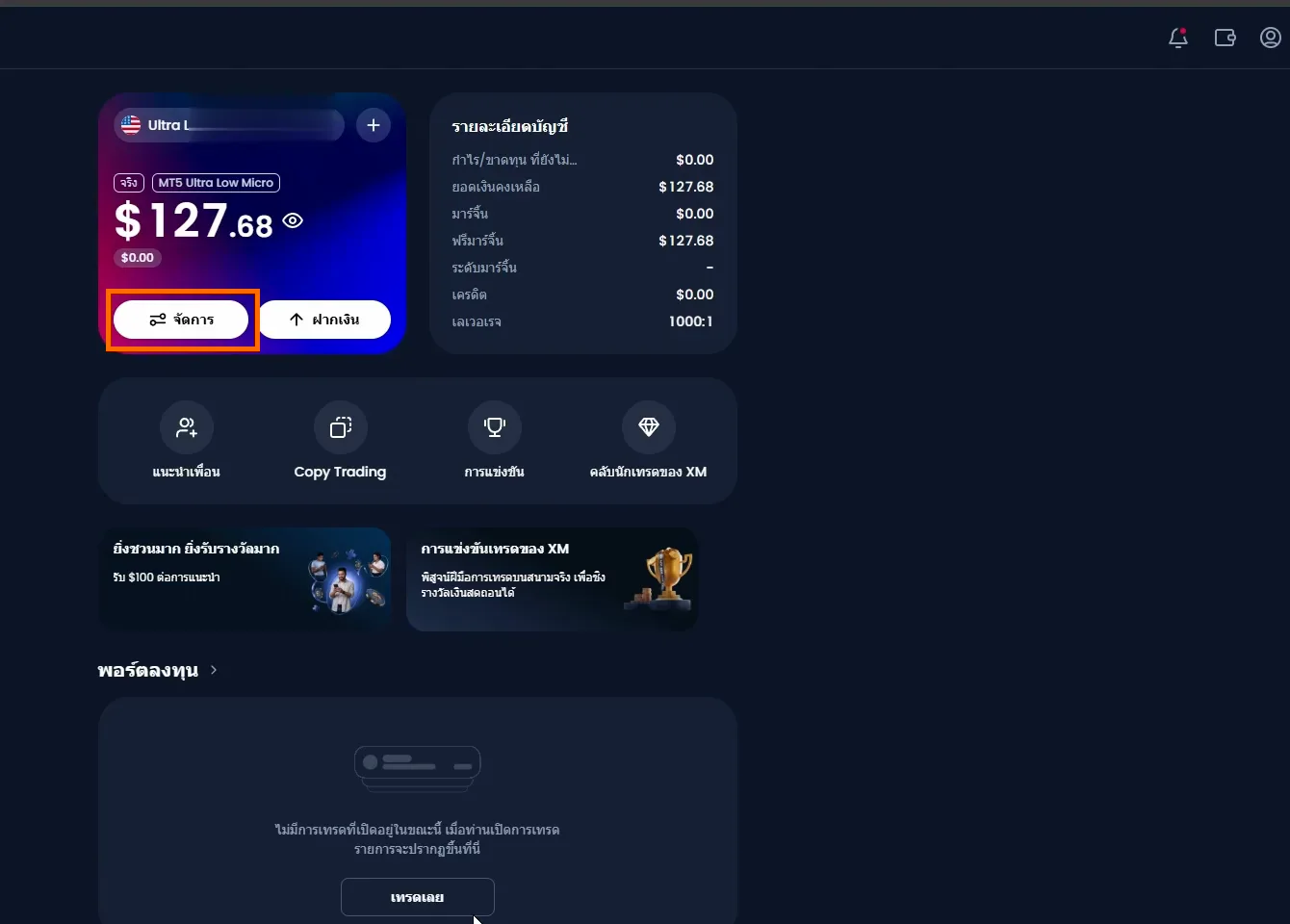
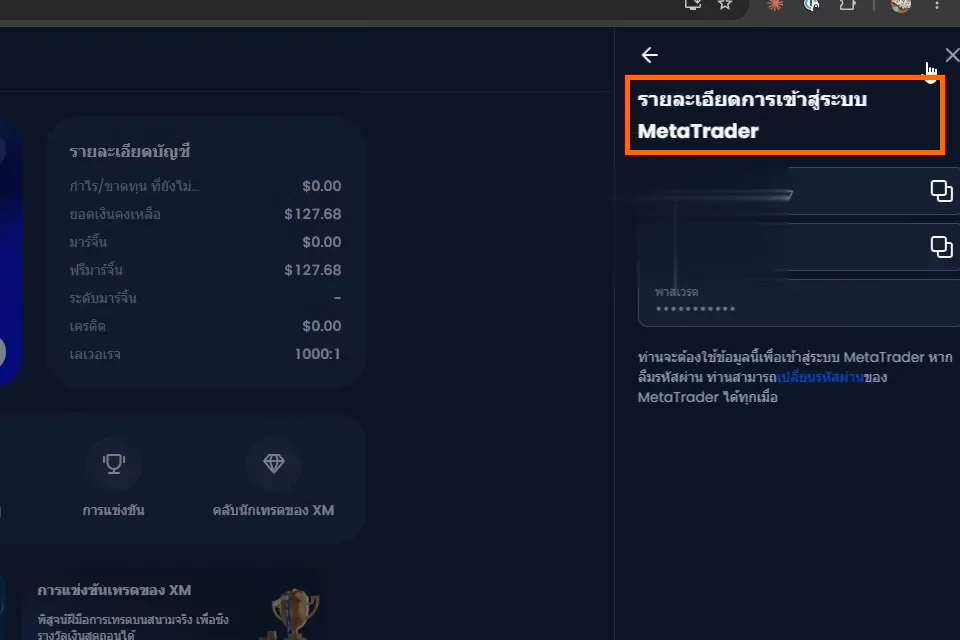
Next, click “Manage” on your account card and open “MetaTrader login details”. This page matters a lot — it holds the Login / Password / Server you’ll need to connect MT5 in step 3.
NOTE
Keep these credentials safe and never share them with anyone.
2. Download and Install MetaTrader 5
In the XM member area go to More → Learning → MT5 trading platform, download the Windows version, then run the installer.
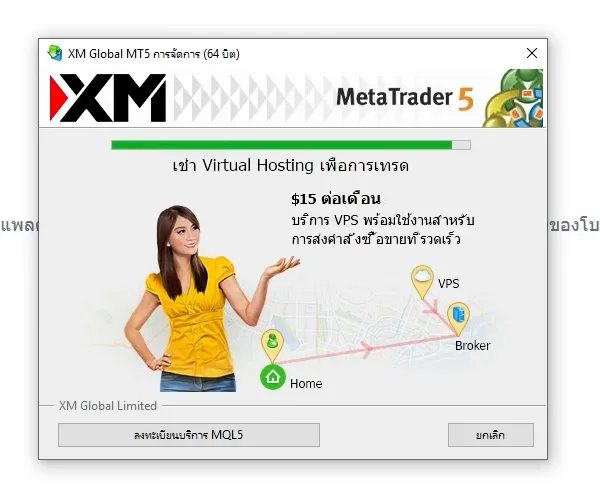
Click through the installation as usual — MT5 opens automatically when it finishes.
3. Connect Your XM Account to MT5
In MT5 go to File → Open an Account, search for the broker by typing “XM”, and select XM Global Limited.
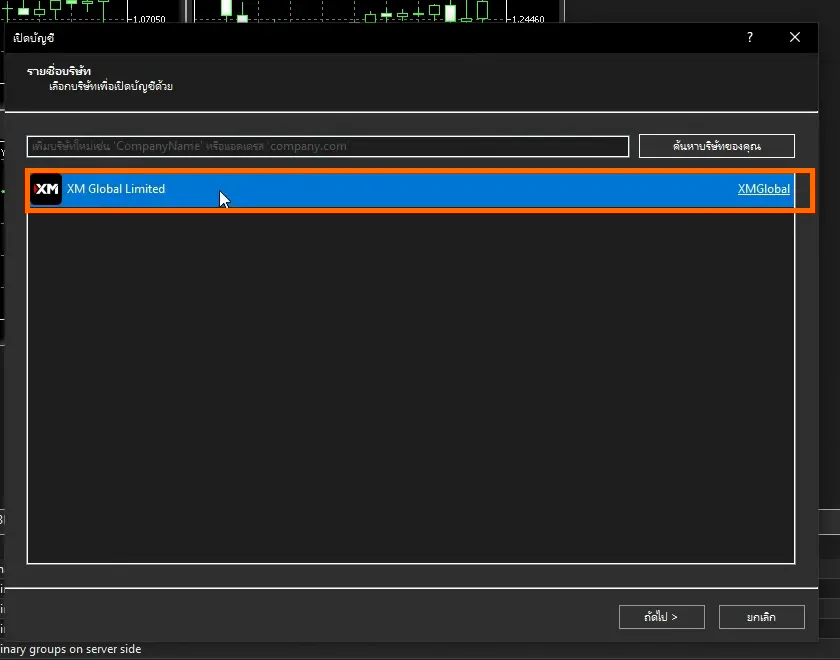
Choose “Connect with an existing trade account”, fill in the Login / Password / Server from step 1, and click Finish.
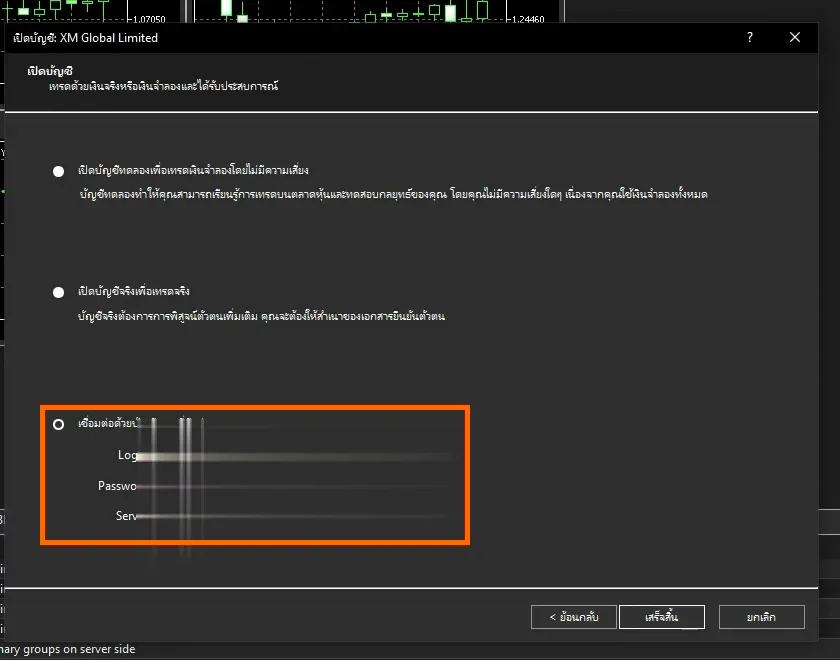
If the connection succeeds, the bottom-right corner of MT5 shows live traffic numbers (not “No connection”).
4. Open the Gold (GOLD) Chart on M15
Press Ctrl+U (or right-click Market Watch → Symbols) and search for “GOLD”. Pick GOLD# under Spot Metals Ultra Low (the symbol name can differ by account type, e.g. GOLD or GOLD#).
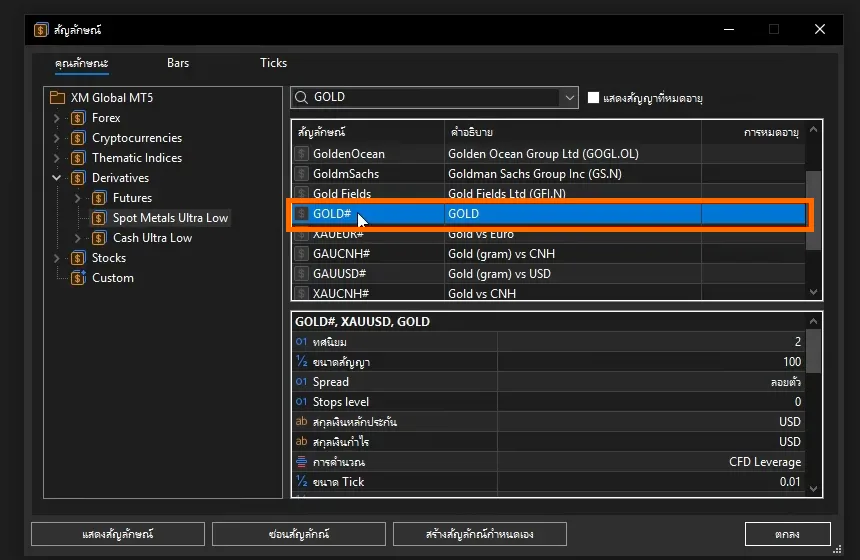
Then open the GOLD chart and set the timeframe to M15 in the top toolbar.
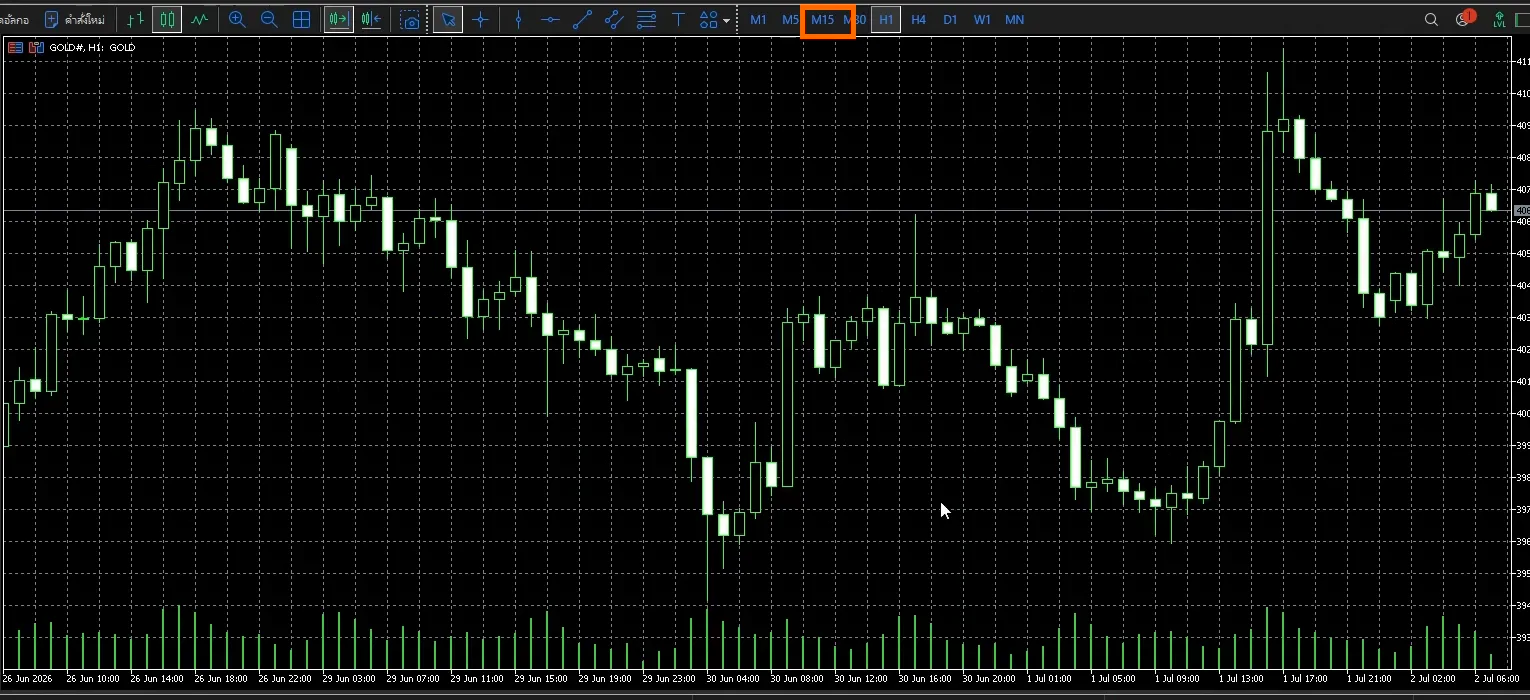
NOTE
gdBasket is designed for GOLD on the M15 timeframe only — double-check before moving on.
5. Meet and Download the gdBasket EA
gdBasket is a Buy Grid EA for GOLD M15 working with DCA + ATR grid + common TP. It’s built by the IntensiveTrader team and free to download.
What beginners should know before using it:
- The EA is locked to run only on GOLD with the XM broker
- It has per-round risk capping — if losses reach your configured Capital, it auto-stops the round
- It gets updated regularly, so always grab the latest version
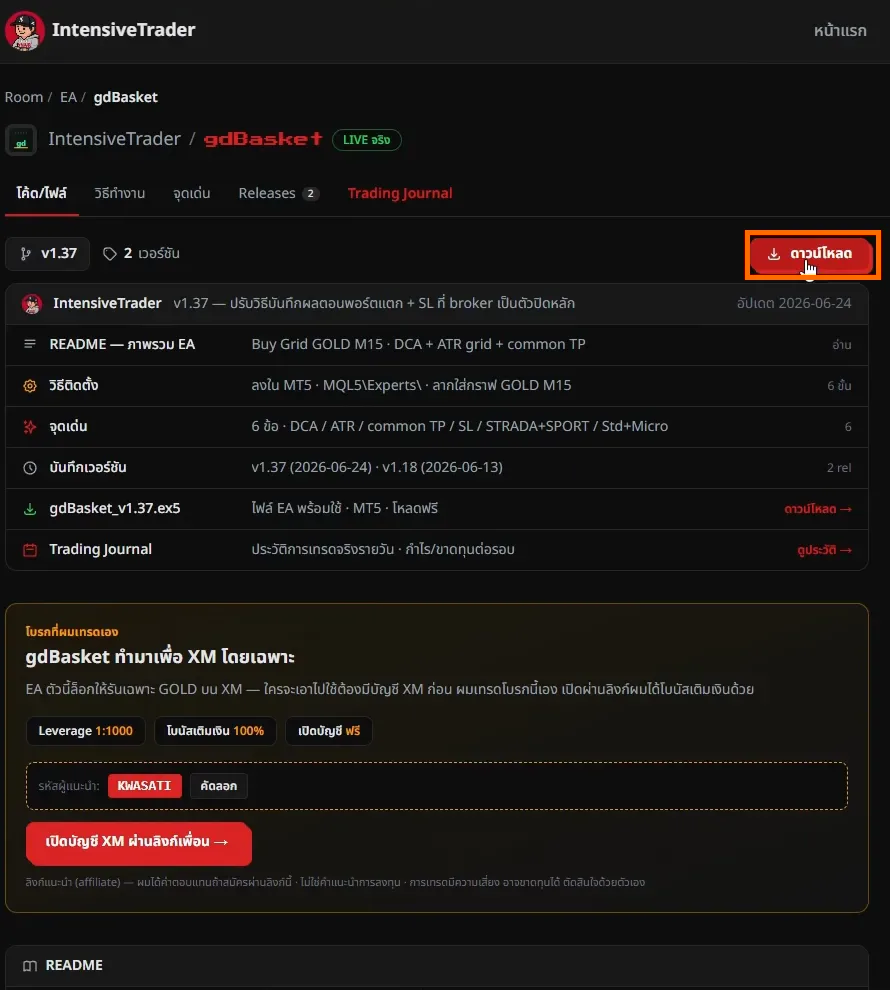
Download the EA file at go.sornwinth.com/gdbasket-ea-b
and press Download — you’ll get a gdBasket_vX.XX.ex5 file.
6. How to Install the EA in MT5
Back in MT5, go to File → Open Data Folder.
A File Explorer window pops up — navigate into MQL5 → Experts
and copy gdBasket_vX.XX.ex5 from your Downloads folder into it.
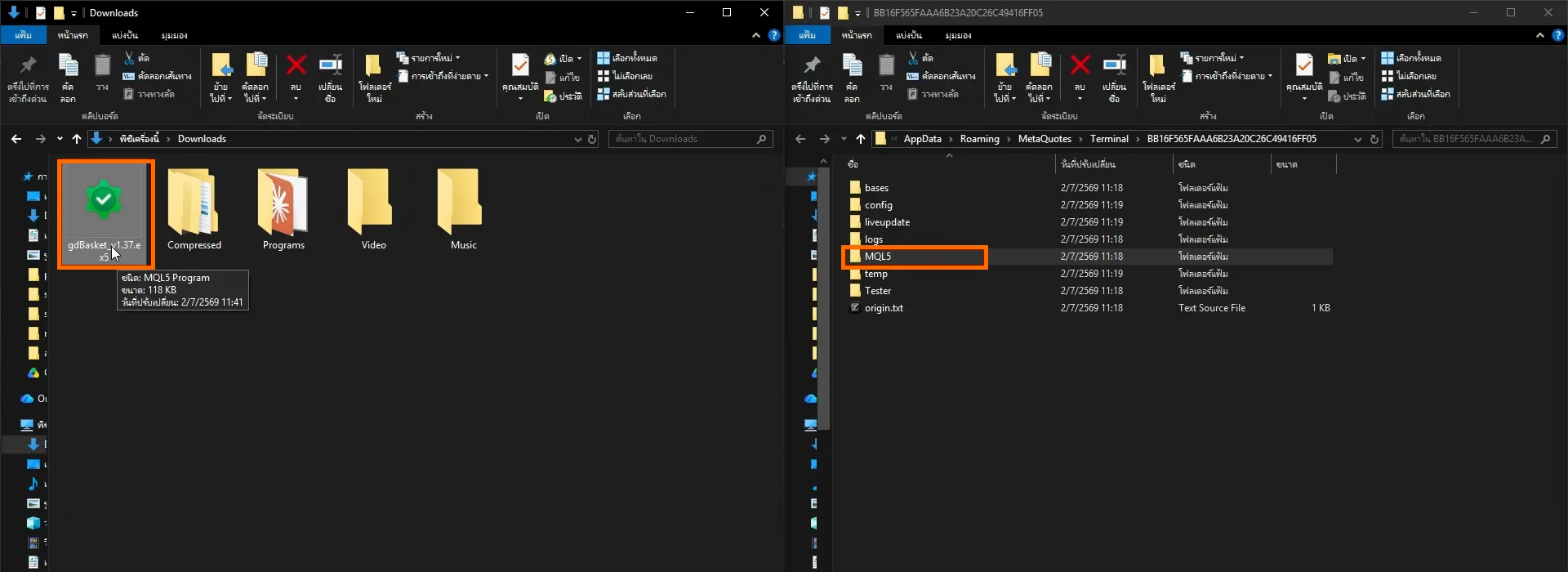
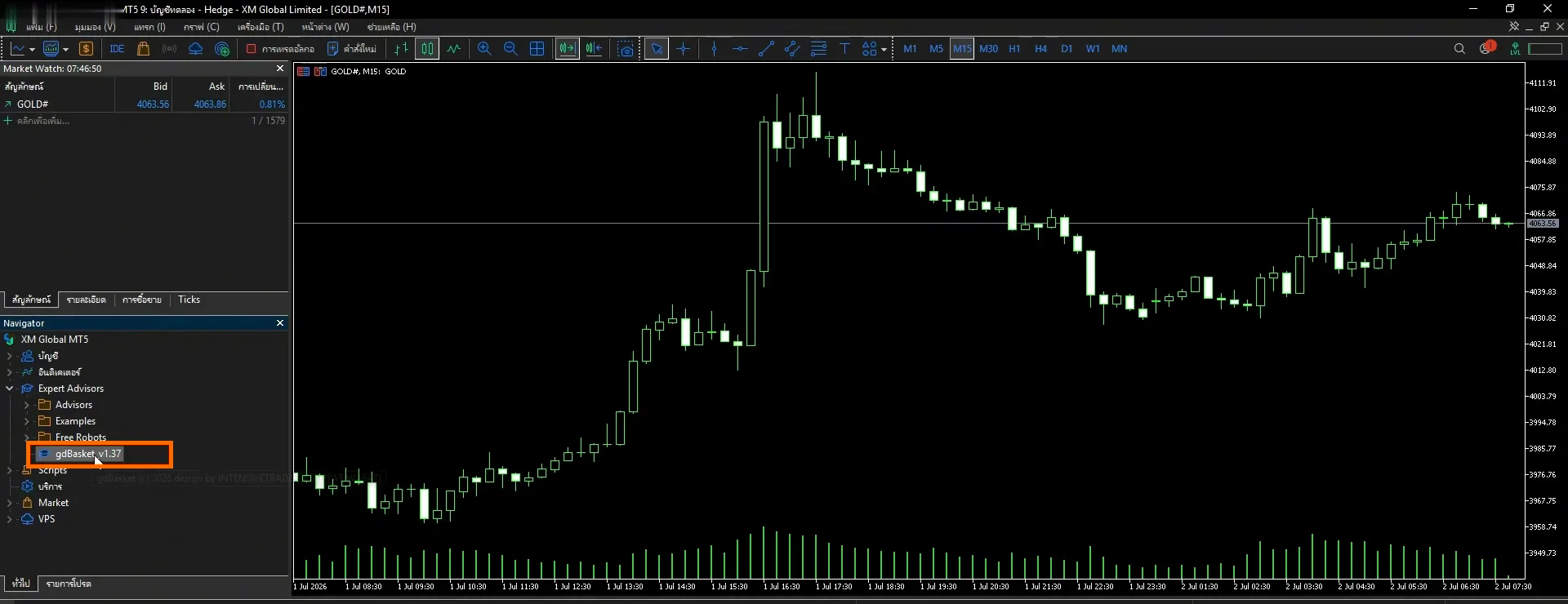
Then, in MT5, right-click Expert Advisors in the Navigator panel and hit Refresh. gdBasket appears — drag it onto the GOLD M15 chart you opened earlier.
7. Configure the EA and Capital per Round
When you drop the EA onto the chart, a settings window appears.
On the Common tab — tick Allow Algo Trading.
On the Inputs tab — the most important value is Capital / round (USD): the budget the bot uses per trading round, which is also that round’s maximum loss cap.
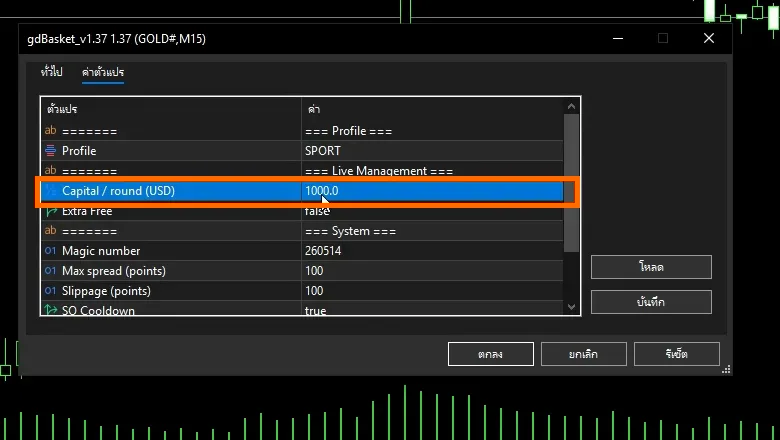
The simple rule: set Capital to an amount you can genuinely afford to risk — not your whole balance. Leave the other values (Profile, Magic number, Max spread, etc.) at their defaults and click OK.
8. Let the Bot Start Trading
Finally, click the Algo Trading button in the top toolbar so it turns green.
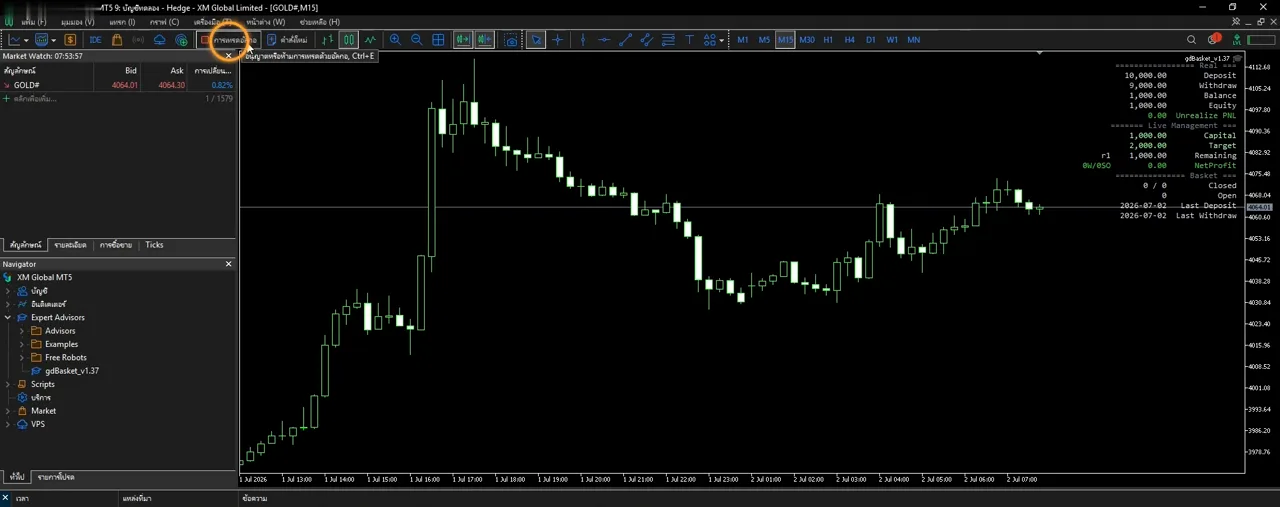
Confirm the EA is alive in the Experts tab at the bottom — an init OK message means the bot is ready.
From here it watches the chart and places orders on its own.
IMPORTANT
The bot only works while your computer and MT5 stay on. If you shut down, the bot stops managing orders immediately (look into a VPS if you want 24/7 uptime).
Money Management
The part that matters more than installation is surviving long-term:
- Start as small as possible — try the minimum deposit, or a Demo account first, until you understand how the bot behaves
- Split your funds into rounds — never set Capital equal to your entire balance; always keep money that isn’t in the game
- Withdraw with discipline — review results round by round and take some profit out instead of compounding forever
- Accept losing rounds — Grid/DCA EAs get hurt when the market runs hard in one direction (e.g. big news); your Capital value is the damage ceiling you chose in advance
Summary + Warnings
- An EA removes emotion and chart-watching, but it does not guarantee profit — results depend on market conditions
- Never trade with borrowed money or money you can’t afford to lose
- Check your portfolio at least once a day, even though the bot trades by itself
- Download the EA only from the official source to avoid fake or malware-laced files
If you’re also interested in AI-assisted signal trading, continue with the UCDST Script for Binary Option and the ChatGPT-built indicator script.
Frequently Asked Questions (FAQ)
What is an EA (trading bot)?
An EA (Expert Advisor) is an automated trading program that runs inside MetaTrader. It opens and closes orders based on rules coded into its system, so you don’t have to watch the chart — ideal for people who can’t monitor the market all day.
How much capital does the gdBasket gold bot need?
The video uses an XM Micro account with a recommended minimum of $100; a Standard account is recommended from $1,000. Set the Capital-per-round value to an amount you can genuinely afford to risk — never your whole balance.
Is the gdBasket EA really free, and does it work with other brokers?
It’s free to download, but the EA is locked to run only on the GOLD chart with the XM broker on the M15 timeframe. It cannot be used with other brokers or other instruments.
Do I need to keep my computer on all the time?
Yes. The EA only works while your computer and MT5 are running. If you shut down, the bot stops managing orders immediately. People who want 24/7 uptime typically use a VPS.
Is profit guaranteed with a gold trading bot?
No. An EA removes emotion and follows its system with discipline, but results depend on market conditions, and losing rounds happen — especially when the market runs hard in one direction. Always start small or with a Demo account.
Disclaimer
IMPORTANT
Trading involves risk. Never invest all of your money.
This article is for educational purposes only and is not investment advice. Account-opening links in this article are affiliate links — the team earns a commission if you sign up through them, at no extra cost to you.
If you’d like to learn about diversification and splitting your portfolio, watch the clip below:
Hope this helps every beginner out there.
Happy Trading!
FAQ
What is an EA (trading bot)?
An EA (Expert Advisor) is an automated trading program that runs inside MetaTrader. It opens and closes orders based on rules coded into its system, so you don't have to watch the chart — ideal for people who can't monitor the market all day.
How much capital does the gdBasket gold bot need?
The video uses an XM Micro account with a recommended minimum of $100; a Standard account is recommended from $1,000. Set the Capital-per-round value to an amount you can genuinely afford to risk — never your whole balance.
Is the gdBasket EA really free, and does it work with other brokers?
It's free to download, but the EA is locked to run only on the GOLD chart with the XM broker on the M15 timeframe. It cannot be used with other brokers or other instruments.
Do I need to keep my computer on all the time?
Yes. The EA only works while your computer and MT5 are running. If you shut down, the bot stops managing orders immediately. People who want 24/7 uptime typically use a VPS.
Is profit guaranteed with a gold trading bot?
No. An EA removes emotion and follows its system with discipline, but results depend on market conditions, and losing rounds happen — especially when the market runs hard in one direction. Always start small or with a Demo account.