UCDST trading script for beginners, with usage instructions and order entry guide.
Interested in starting to trade with IQ Option? Open an account here
How to Use the Script
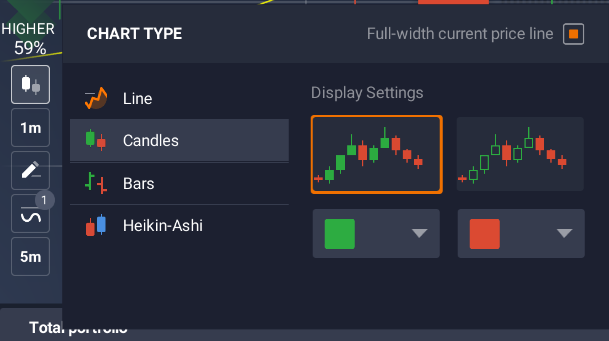
1. Set Up the Chart
Set up the chart to display candlesticks, as shown in the image below:
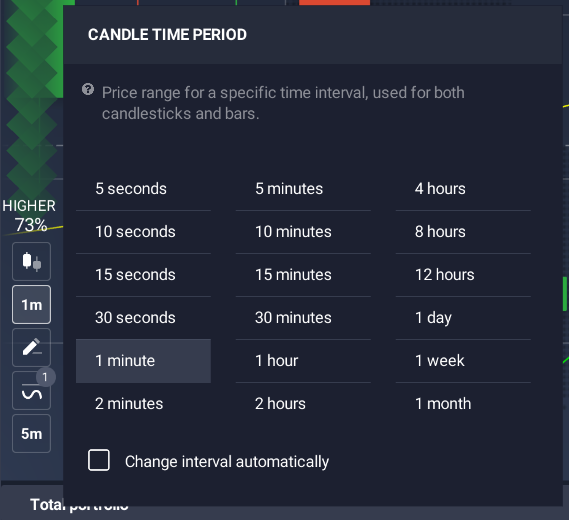
2. Adjust Time to 1 Minute
Set the timeframe to 1 minute:
NOTE
Make sure that “Change Interval Automatically” is not selected to prevent the timeframe from changing automatically.
3. Install the Script
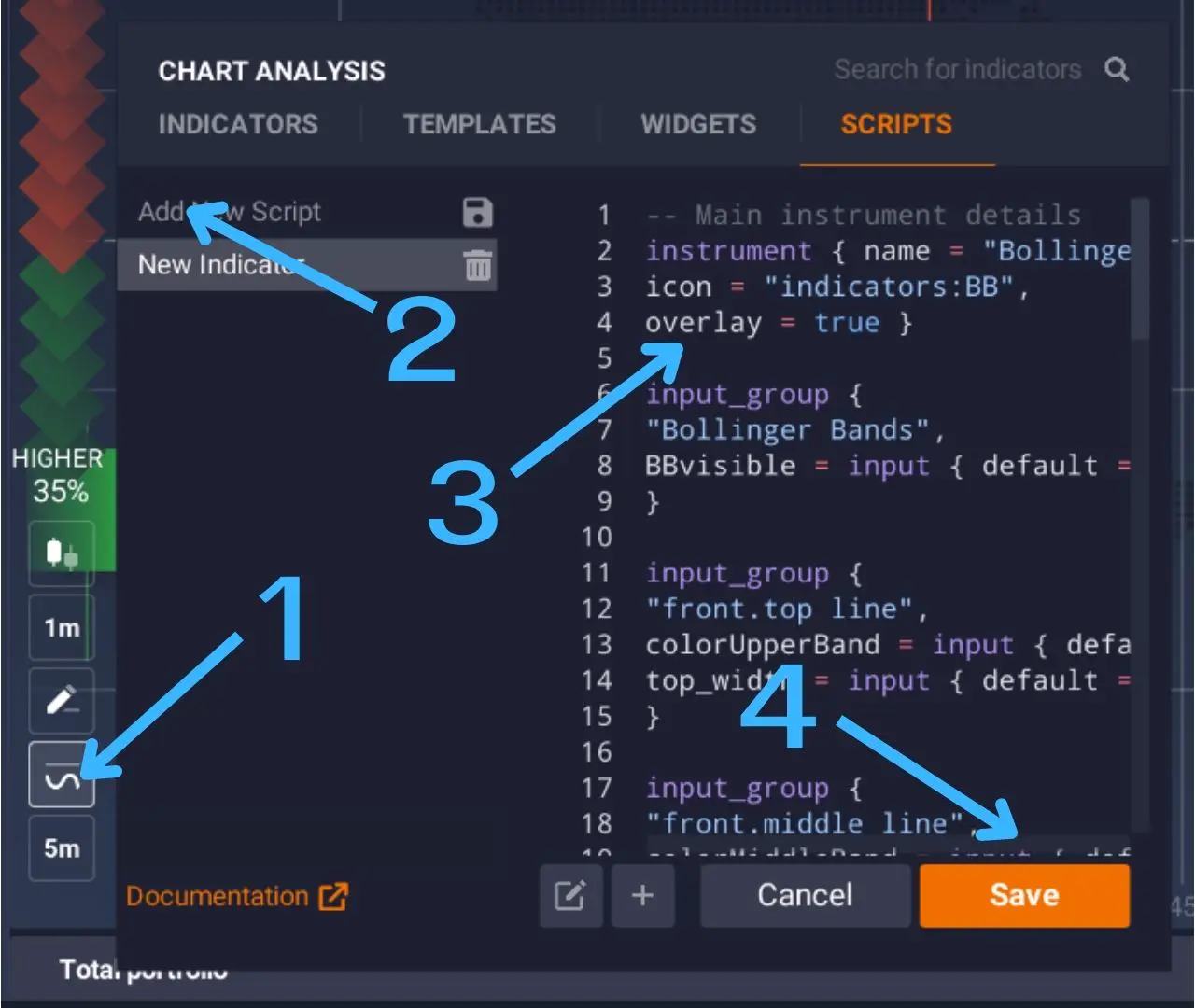
- Click on “indicator”
- Click “add new script”
- Delete all existing code and paste the code provided below into the code field
- Click “Save”
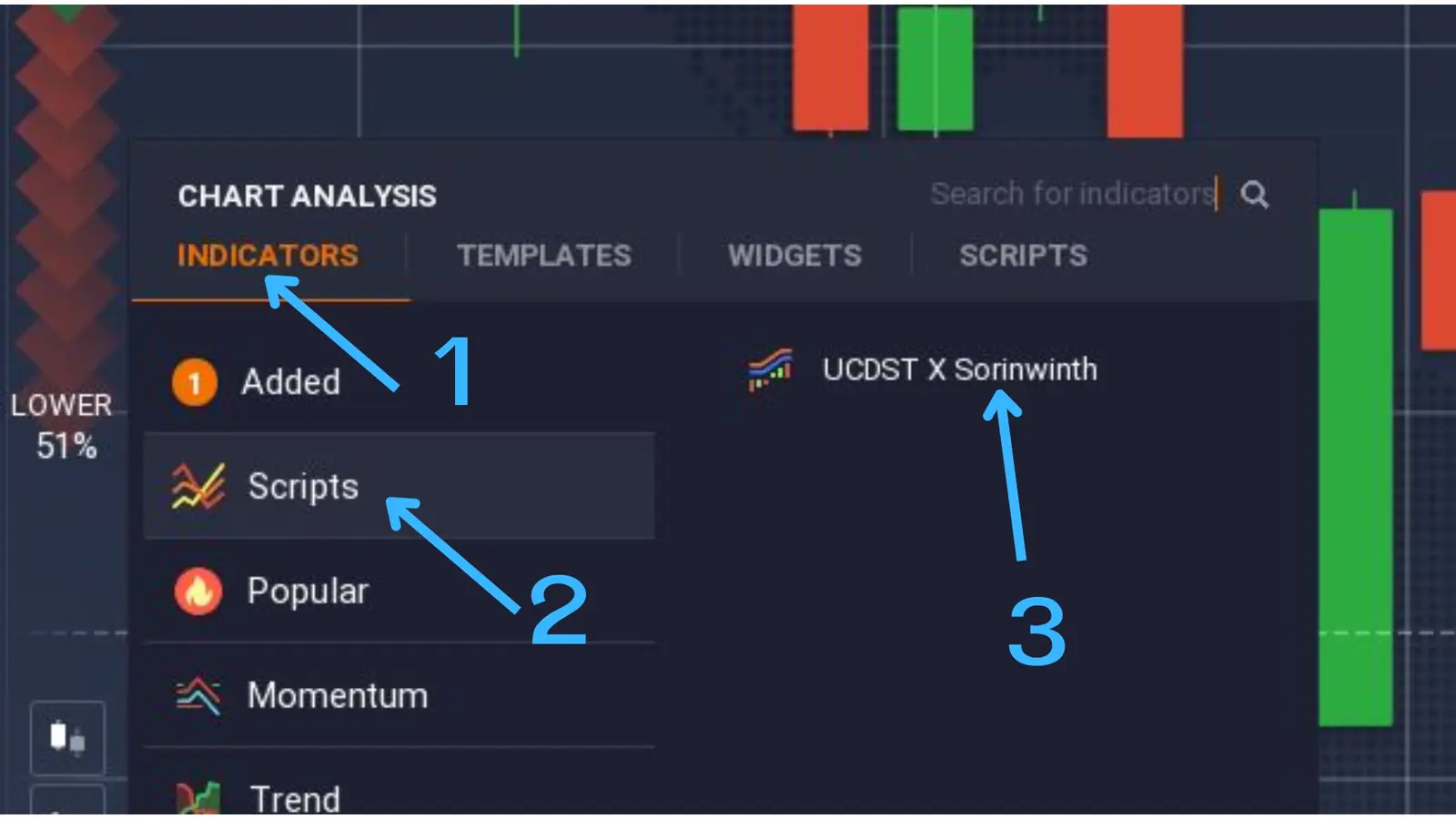
4. Apply the Script to the Chart
- Click the “indicator” tab
- Click “Script”
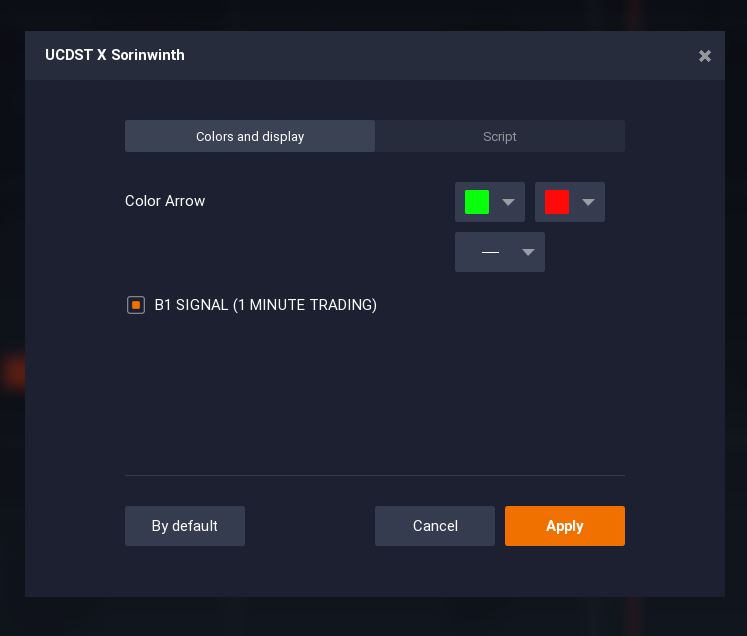
- Select “UCDST x Sornwinth”
- Click the “Apply” button
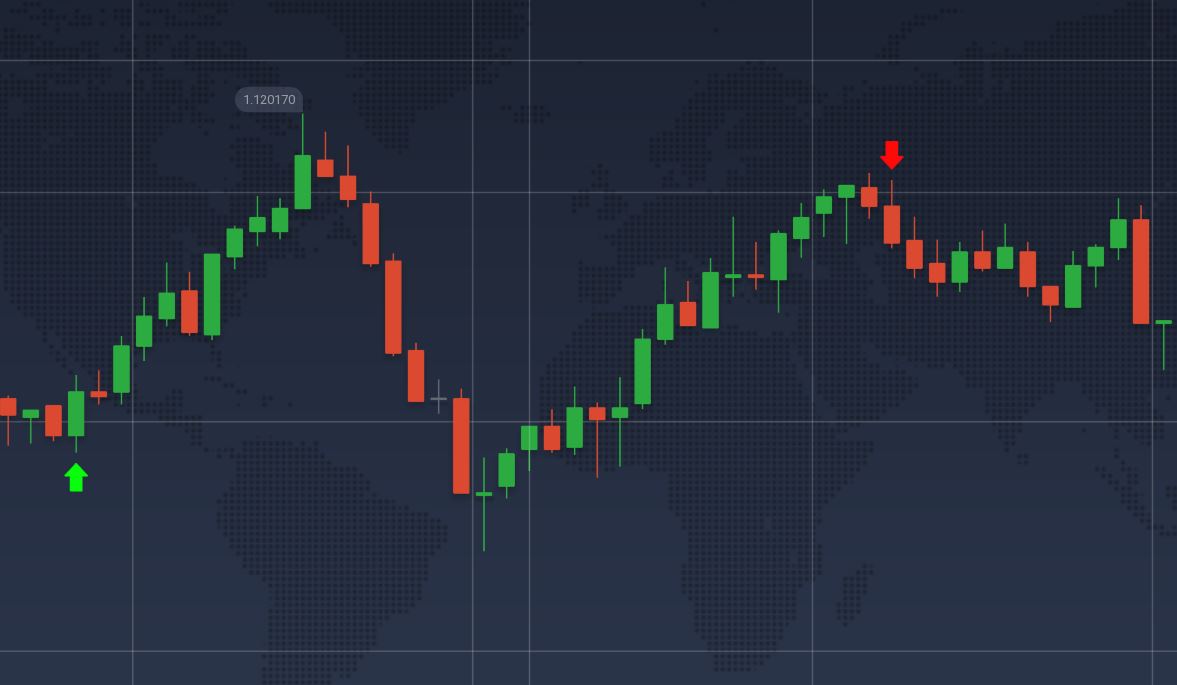
Overall, you should see a chart that looks similar to this:
Entering Orders
1. Regular Order Entry
When an arrow signal appears, click “Buy” or “Sell” at the opening of the next candle after the signal candle (click at exactly 30 seconds).
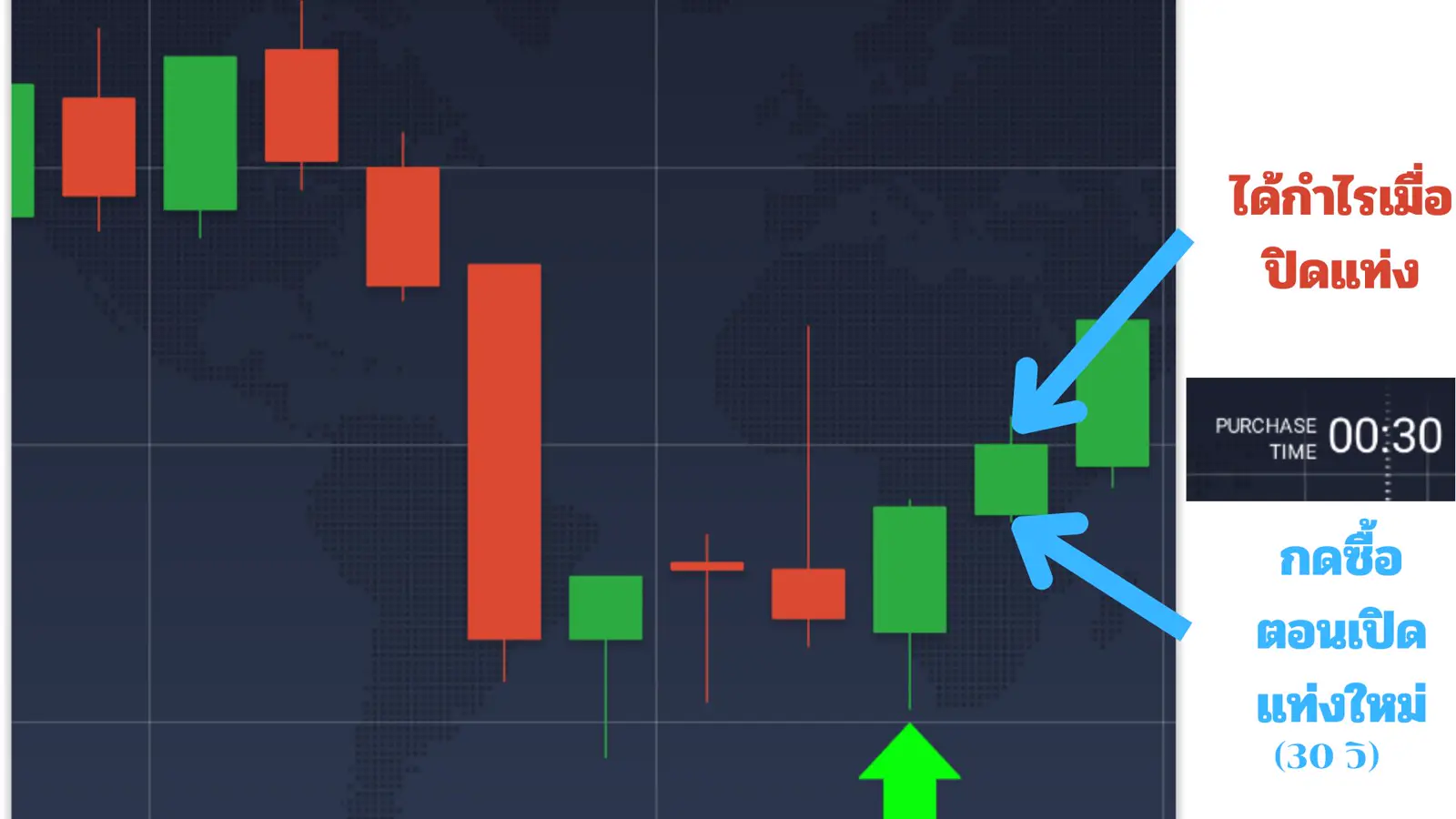
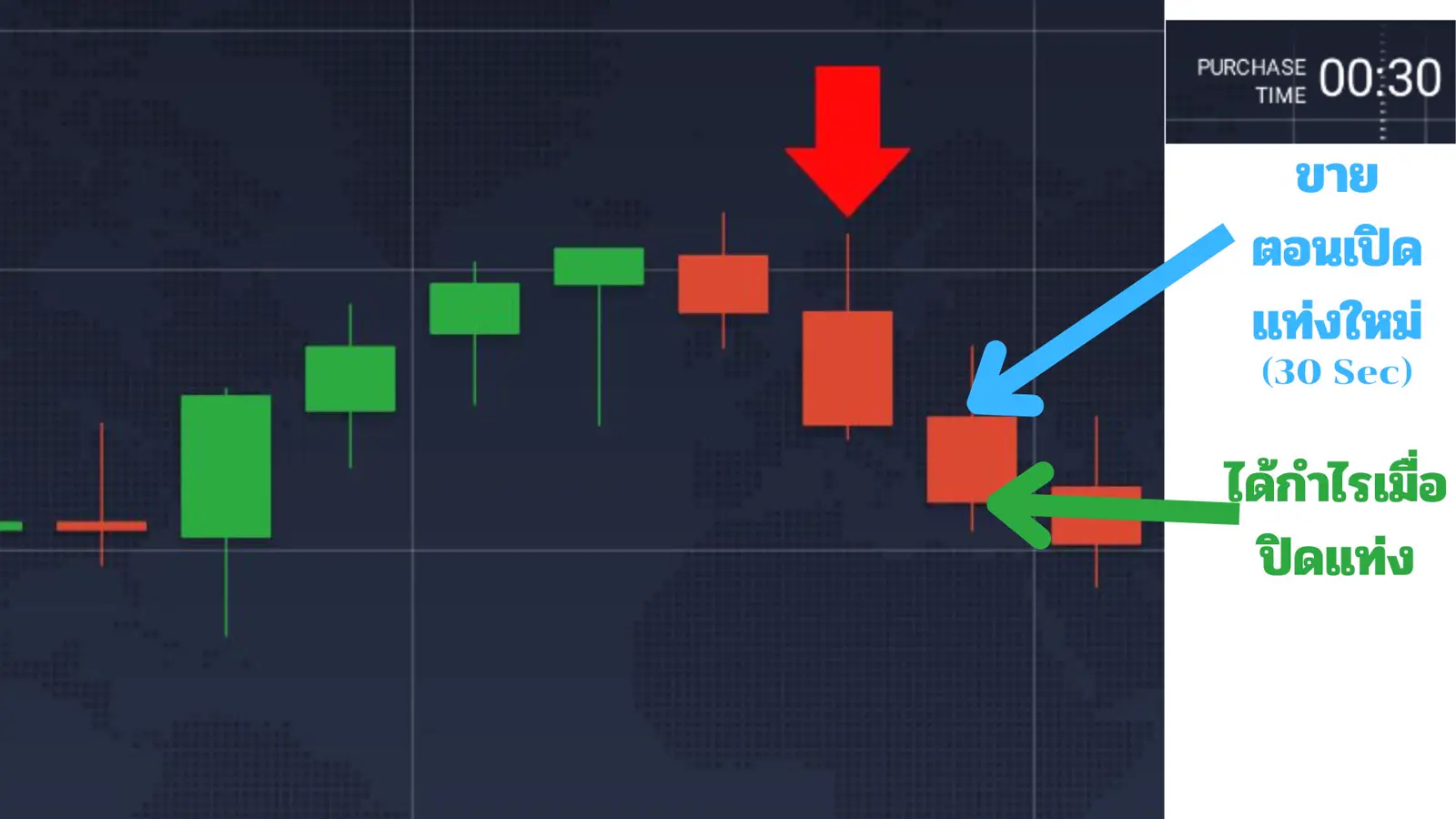
If you enter an order according to step 1 and it’s not successful, you can follow step 2 to martingale the order.
This can increase the overall profitability of your investment portfolio.
2. Martingale Strategy
This trading script uses a two-phase signal approach. If you enter an order immediately when the signal appears and the price doesn’t change,
it’s possible that the signal might be delayed by 1 minute, and there’s a high chance the next candle will be successful.
You can immediately martingale the order when the first candle closes at a loss, to potentially win on the next candle.
To compensate for the capital lost from the previous losing candle, the value of the new order should be 3 times the initial stake.
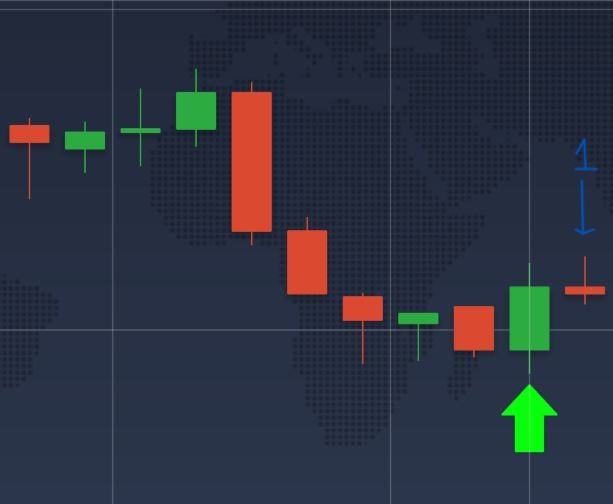
For example, if a signal appears and you enter an order of 100 baht which loses,
as soon as the first order is determined to be a loss, immediately place a new order of 300 baht for the next candle.
When the second candle (with the 3x order) closes, you’ll see that we win according to the initial signal.
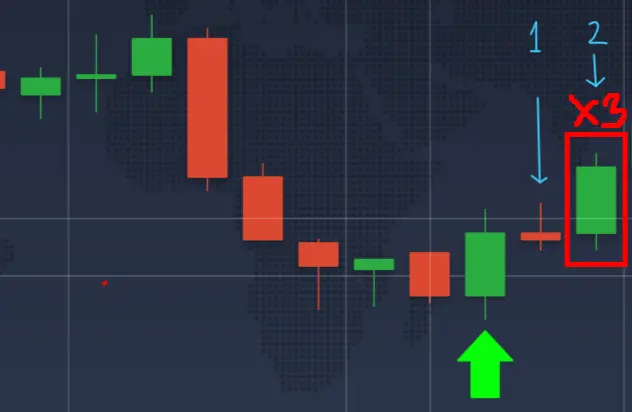
This martingale strategy can increase the overall win rate of your portfolio, resulting in higher profits.
However, there’s still a chance that the second candle could also lose. If you want to increase accuracy,
please refer to the “Techniques to Increase Accuracy” section.
You can watch a video tutorial covering everything from script installation to order entry in the clip below:
NOTE
Coming Soon
Script
Click the Copy Code button in the top right corner of the block below to use it immediately.
-----------------------------------------------------------------
---- "UPGRADE CDST is The Best Signal for BINARY OPTION ---------
---- CREATE BY "KITTITAT WASATI" --------------------------------
---- Youtube: https://www.youtube.com/@IntensiveTrader ----------
-----------------------------------------------------------------

---- Hello all from THAILAND! -----------------------------------
---- This Indicator make for trading binary option --------------
---- It is suitable for beginners and make begin to trader ------
---- This is not financial advice -------------------------------
---- keep calm and stay cool ------------------------------------

-----------------------------------------------------------------
---- Modified Version of Upgrade CDST ---------------------------
---- BY "Sornwinth Channel" -------------------------------------
---- Youtube: https://www.youtube.com/@sornwinth ----------------
-----------------------------------------------------------------

instrument { name = "UCDST X Sorinwinth",
             icon="indicators:MACD",
             overlay = true
           }

------ input group ------
-- Arrow --
input_group {
   "Color Arrow",
   colorBuy = input { default = "#08FE0B", type = input.color },
   colorSell = input { default = "#FF0909", type = input.color },
   width = input { default = true, type = input.line_width}
}
-- b1 Signal --
input_group {
   "B1 SIGNAL (1 MINUTE TRADING)",
    b1_visible = input { default = true, type = input.plot_visibility }
}

-- plot --
sma5 = sma (close, 5)
ema15 = ema (close, 15)

-----------------------------------------
------ END OF FIST SCRIPT ---------------
-----------------------------------------

-----------------------------------------
------ B1 SIGNAL ------------------------
-----------------------------------------
-- B1 Condition --
b1candle4buy = close[1] < sma5[1] and
               close[2] < sma5[2] and
               close[3] < sma5[3] and
               open[1] < sma5[1] and
               open[2] < sma5[2] and
               open[3] < sma5[3]
b1candle4sell = close[1] > sma5[1] and
                close[2] > sma5[2] and
                close[3] > sma5[3] and
                open[1] > sma5[1] and
                open[2] > sma5[2] and
                open[3] > sma5[3]
bigcandlebuy = abs(open-close) > abs(high-close)*2
bigcandlesell = abs(open-close) > abs(low-close)*2
bigcandle = abs(close-open) > abs(close[1]-open[1]) and
            abs(close-open) > abs(close[2]-open[2]) and
            abs(close-open) > abs(close[3]-open[3])
b1buycon = open < sma5 and
           close > sma5 and
           b1candle4buy and
           bigcandlebuy and
           bigcandle and
           close < ema15 and
           high < ema15 and
           ema15 > sma5
b1sellcon = open > sma5 and
            close < sma5 and
            b1candle4sell and
            bigcandlesell and
            bigcandle and
            close > ema15 and
            low > ema15 and
            ema15 < sma5
-- end of B1 Condition --

if b1_visible then
-- B1 Buy --
    plot_shape(b1buycon,
        "B1_Buy",
        shape_style.arrowup,
        shape_size.auto,
        colorBuy,
        shape_location.belowbar,
        0,
        "",
        colorBuy
    )
-- B1 Sell --
    plot_shape(b1sellcon,
        "B1_Sell",
        shape_style.arrowdown,
        shape_size.auto,
        colorSell,
        shape_location.abovebar,
        0,
        "",
        colorSell
    )
end
-----------------------------------------
------ END OF B1 SIGNAL -----------------
-----------------------------------------

----------------------------------------------------------
---------- END OF SCRIPT UPGRADE CDST --------------------
----------- CREATE BY KITTITAT WASATI --------------------
----------------- THANK YOU! -----------------------------
----------------------------------------------------------
Techniques for Improving Accuracy and Acknowledgments
This script was written by Art “Intensive Trader”
The Sornwinth team has obtained permission to improve the script and share it further.
To trade this script with high accuracy, friends should enter trades during “Sideways” chart periods or when the chart is forming a “price consolidation box”. This requires an understanding of chart trends.
If you’re interested in additional accuracy techniques, you can watch and follow Art from the video below.
Disclaimer
IMPORTANT
Investing involves risks. Do not invest all your money.
This script is created only to facilitate signal searching. Entering orders/making profits are techniques that traders must practice and understand the market themselves.
If you’re interested in learning about risk diversification or portfolio allocation, check out the video below.
We hope this will be beneficial for all beginners.
Let’s get rich!
🔥 New article: Free Gold Trading Bot (EA) on XM + MT5 — from opening an account to running live
📚 Very new to this? Start here: Beginner Binary Option Trading on Desktop · How to Open an IQ Option Account
FAQ
What is the UCDST script?
UCDST is a beginner-oriented Binary Option helper script for IQ Option. After chart setup and install, it shows on-chart signals you can use as a decision aid when entering trades.
Can a complete beginner install it?
Yes if you follow the video and article step by step: candlestick chart, 1-minute timeframe, apply the script, then practice order entry. Always start on a demo account.
What is Martingale and is it required?
Martingale means increasing stake size after a loss to try to recover. The guide explains it for education only — it is optional and high risk if your bankroll is small.
How much money do I need?
A free demo account needs no real money. Live accounts depend on the broker and your risk tolerance. Only use money you can afford to lose and set a loss cap first.
Does the script guarantee profit?
No. It is a signal-visualization tool, not a profit guarantee. Markets change and losses are normal — practice on demo and manage risk with discipline.